loading.gif
Notes
Login Sign Up Shopping Cart 简体中文
Add to my favorite categories
category Mac Pro
Path Yahoo Bid > Computer & Accessories > Computers > Mac > Desktop > Mac Pro
Remarks
Add my favorite keywords
Keywords
category Mac Pro
Remarks
Join my favorite seller
Seller h6VKN***
Remarks
Add to my blacklist seller
Seller h6VKN***
Remarks
Yahoo Bid Computer & Accessories Computers Mac Desktop Mac Pro
限定!SAPPHIRE PULSE RX5700 8G macEFI 4K@60HzBoot機能対応 Metal対応 2010-2012MacPro 最新macOS Monterey12.7.6まで対応
        

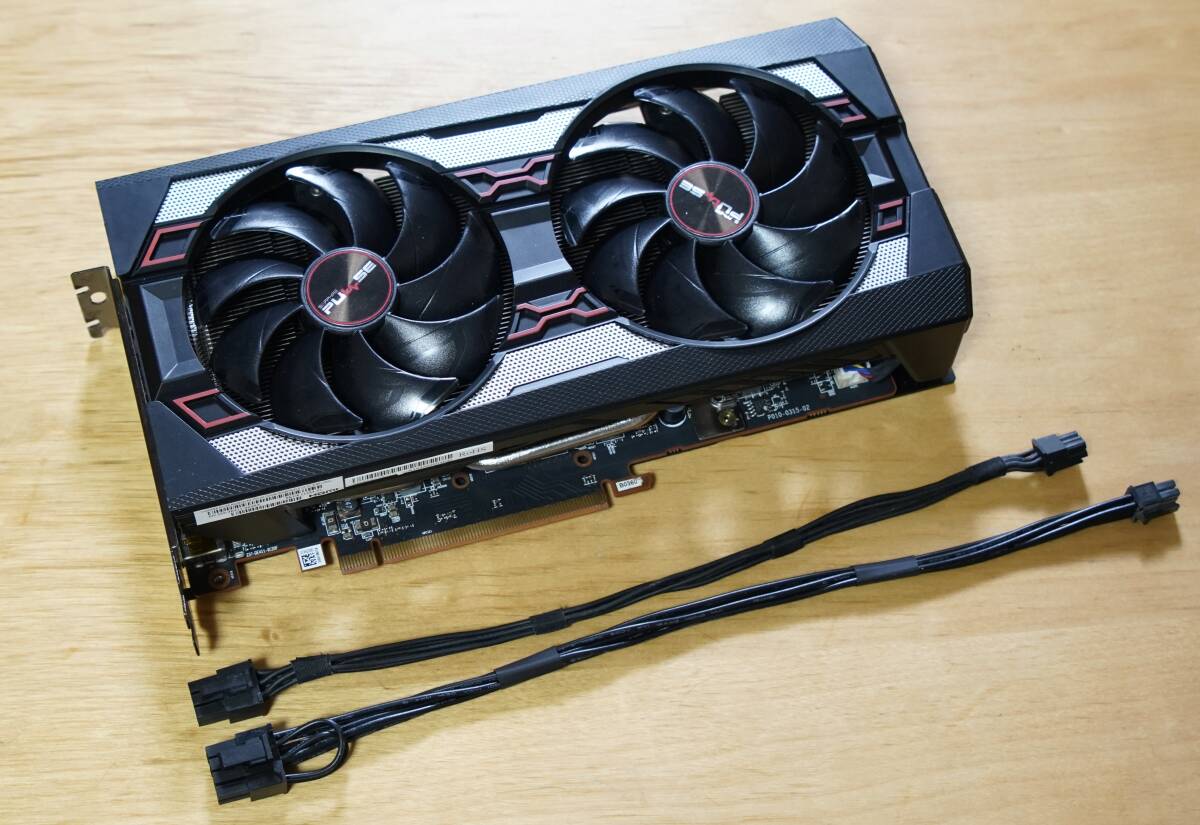
SAPPHIRE PULSE RX5700 8GB macEFI

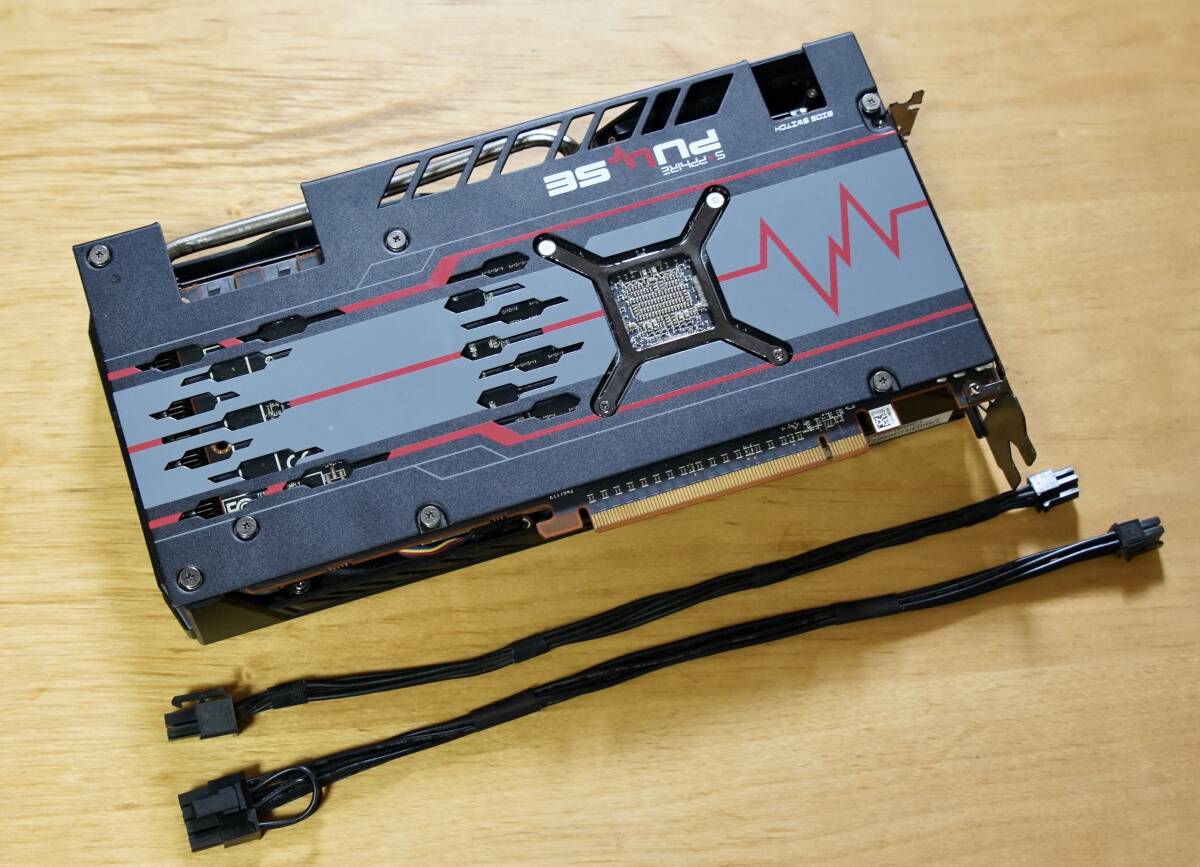
2BIOS機能スイッチ

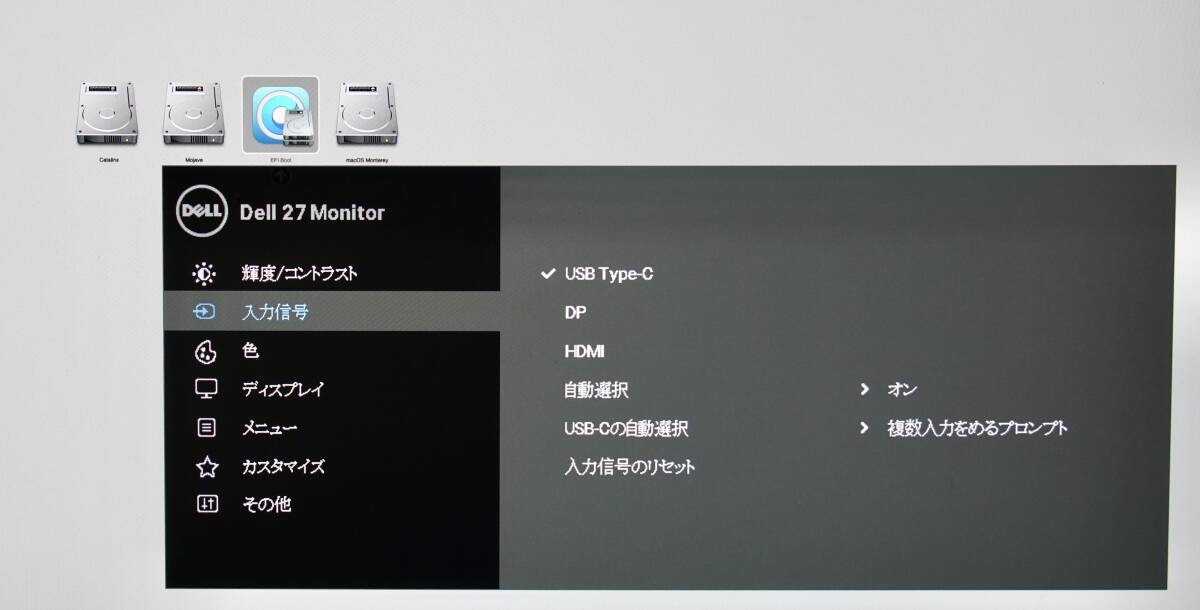
DP1.4-USB Type-C 4K@60Hz Boot機能可能

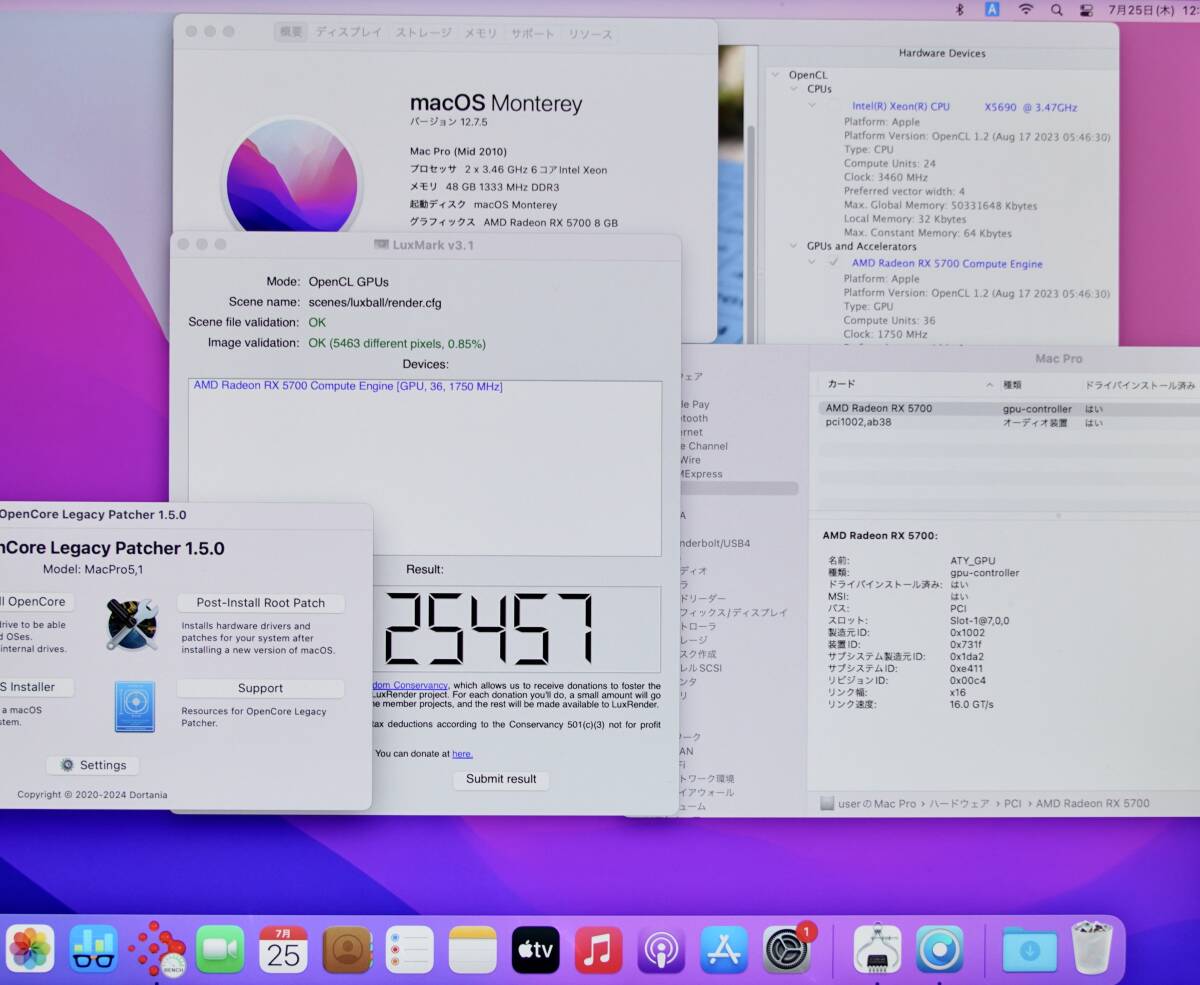
最新macOS Monterey12.7.5

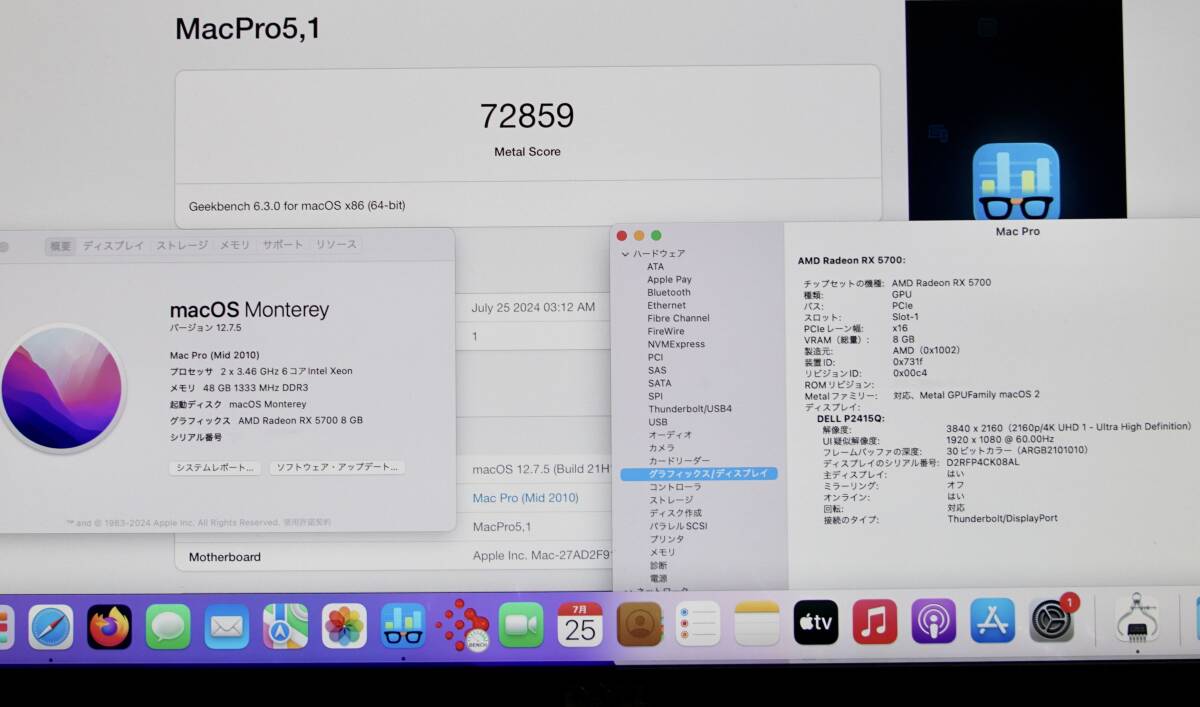
GeekBench6 Metalベンチマーク

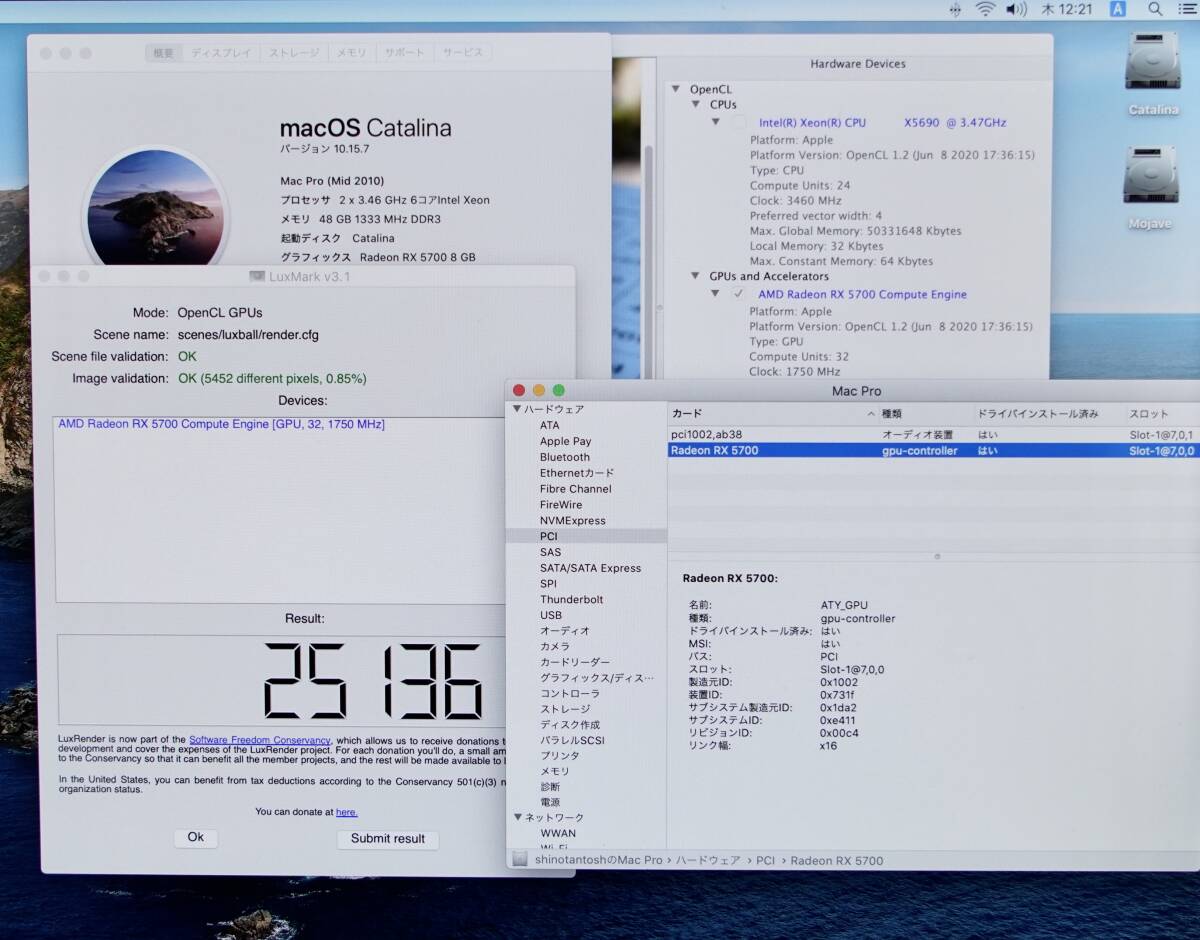
macOS Catalina

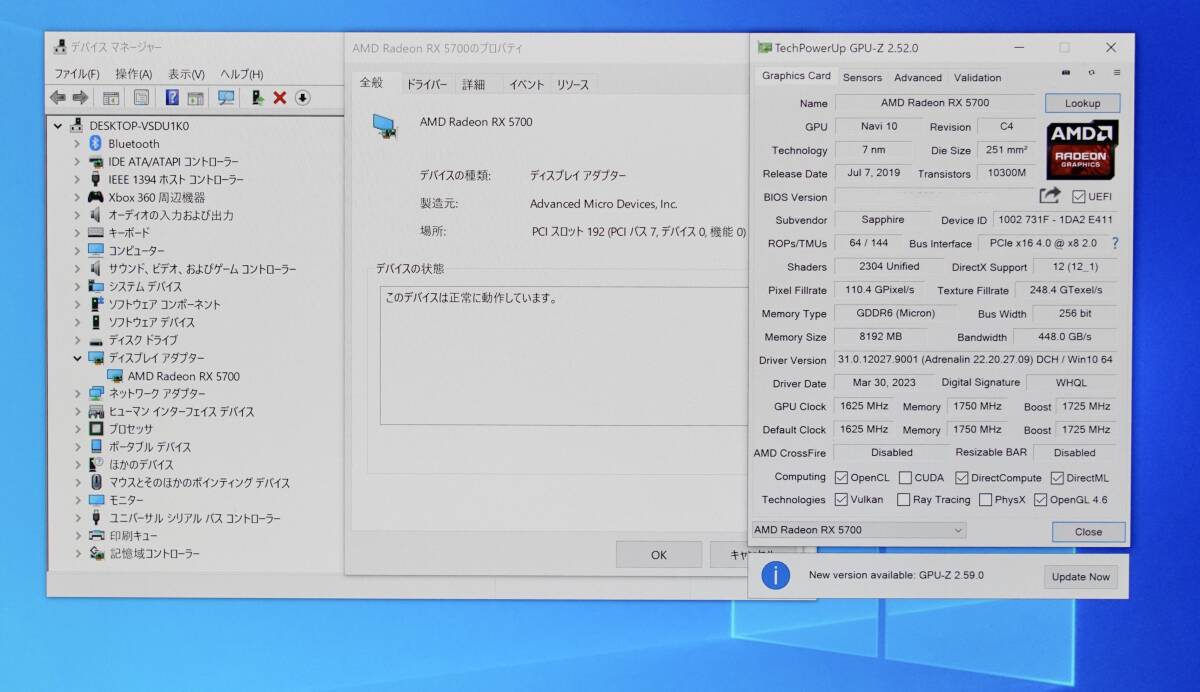
MacPro Windows10Pro 64bit

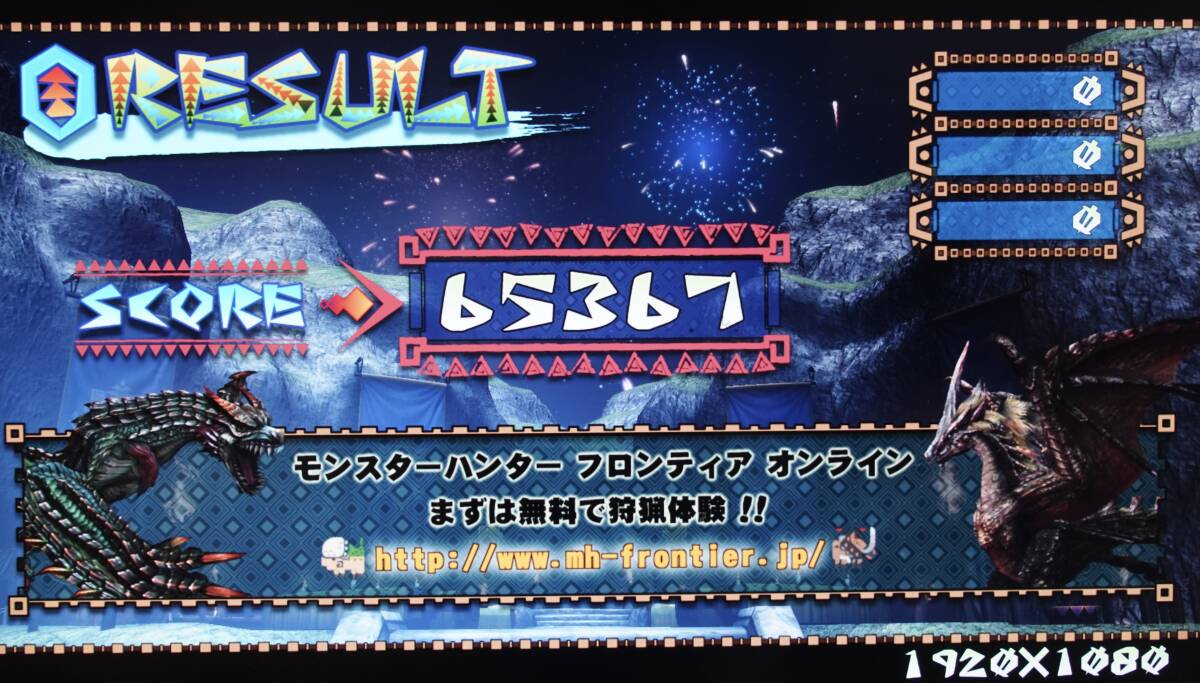
モンスターハンター絆

  • Product Quantity
    : 1
  • Starting Bid
    :48,800円
  • Highest Bidder
    : / Rating:
  • Listing Date
    :2025年12月25日 21時58分
  • Bidding closes on
    :2025年12月26日 21時58分
  • Auction Number
    :1146046720
  • Condition
    :Damaged and stained (specify in description)
  • Automatic Extension
    :Yes
  • Authentication
    :No
  • Early Closing
    :Yes
  • Can I return the product?
    :no
  • Description
  • Q&A ()
  • Cost Estimator
  • Problem Item Response Procedur
Notes
  1. Plug-in electrical appliances are only shipped by air (shipping by sea requires commodity inspection)
  2. ※Please confirm whether it is animal fur. Animal fur products are in conflict with the Washington Treaty and cannot be shipped internationally.
限定!SAPPHIRE PULSE Radeon RX5700 GDDR6 8G macEFI 4K@60HzBoot機能対応 Metal対応 ブーストクロック1750MHz Mid2010-Mid2012MacPro 最新macOS Monterey12.7.6まで対応

対応機種:Mac Pro Mid 2010~Mid2012
対応OS:macOS Catalina ~ macOS Monterey/Windows 7、10、11 <64Bit OS必須>
HDMI/DisplayPort音声出力対応OS  macOS Catalina~macOS Monterey Windows10.11
macEFI Boot機能対応
OCLP BootPicker対応
macOS BootCamp対応
Windows BIOS/UEFI対応

<NaviシリーズRX5700対応OS  macOS Catalina〜macOS Montarey/Windows7.Windows10.Windows1164bit必須>
macOS CatalinaはCatalina Patcherを使用して新規でインストール可能です。
macOS BigSur~macOS MontereyはOpenCoreLegacyPatcherを使用して新規でインストール可能です。

Mid2013MacProに搭載されているD300/D500/D700やRX580、Vega64よりも上位クラスのグラフィックカードになります。

<GeekBench6 Metalスコア>
Mid2010MacPro SAPPHIRE PULSE RX5700 8GB       72859 
Late2013 MacPro AMD FirePro D700 6GB      33765 
Late2013 MacPro AMD FirePro D500 3GB      24877 
Late2013 MacPro AMD FirePro D300 2GB      21138

2025年3月31日にAppleが最新macOS Sequoia15.4をリリース
OCLPも最新2.3.2Ver.がリリースされました。
<Naviシリーズは、現在macOS Ventura、macOS Sonoma、macOS Sequoiaはサポートされていません。>
NaviシリーズはmacOS Catalina〜最新macOS Monterey12.7.6までになります。

Apple推薦!Naviシリーズ限定 SAPPHIRE PULSE Radeon RX5700 GDDR6  8G <macEFI Boot機能が使えるようにファームウェアを注入しました。>
HDRに対応したディスプレイ同期技術「FreeSync 2テクノロジー」に加え、DirectX 12やVulkanなどのAPIに最適化。
ファン回転を徐々に減速し、アイドル時にファン停止させることで低負荷時の騒音を低減する「Intelligent Fan Control 3」
2BIOS機能スイッチ

全ての出力にてmacEFI Boot機能が可能です。
Boot機能とは、起動後にoptionキーを長押しすることでハードディスクやインストールディスクの選択ができる画面が表示されて好きなOSを選択して起動できる機能です。
この機能がないと新規でmacOSをインストールすることやOSのアップデート更に不具合でMacProが再起動してどのHDDで起動すればいいのかわからなくなって起動できなくなったときに絶対に必要になる機能です。
Apple純正のグラフィックカードやmacEFIのファームウェアにアップデートされたグラフィックカードのみmacEFI Boot機能が表示されます。

もちろんmacEFI Boot機能のないWindowsのグラフィックカードでも対応するmacOSは多数ありますがそれはあくまでも先にMacProに使用するWindowsのグラフィックカードが対応するmacOSがインストールされていないと使えません。新規でmacOSをインストールすることやOSのアップデート更に不具合でMacProが再起動してどのHDDで起動すればいいのかわからなくなって起動できなくなったときに何もできません。そうなった時にmacEFI Boot機能が必要になります。

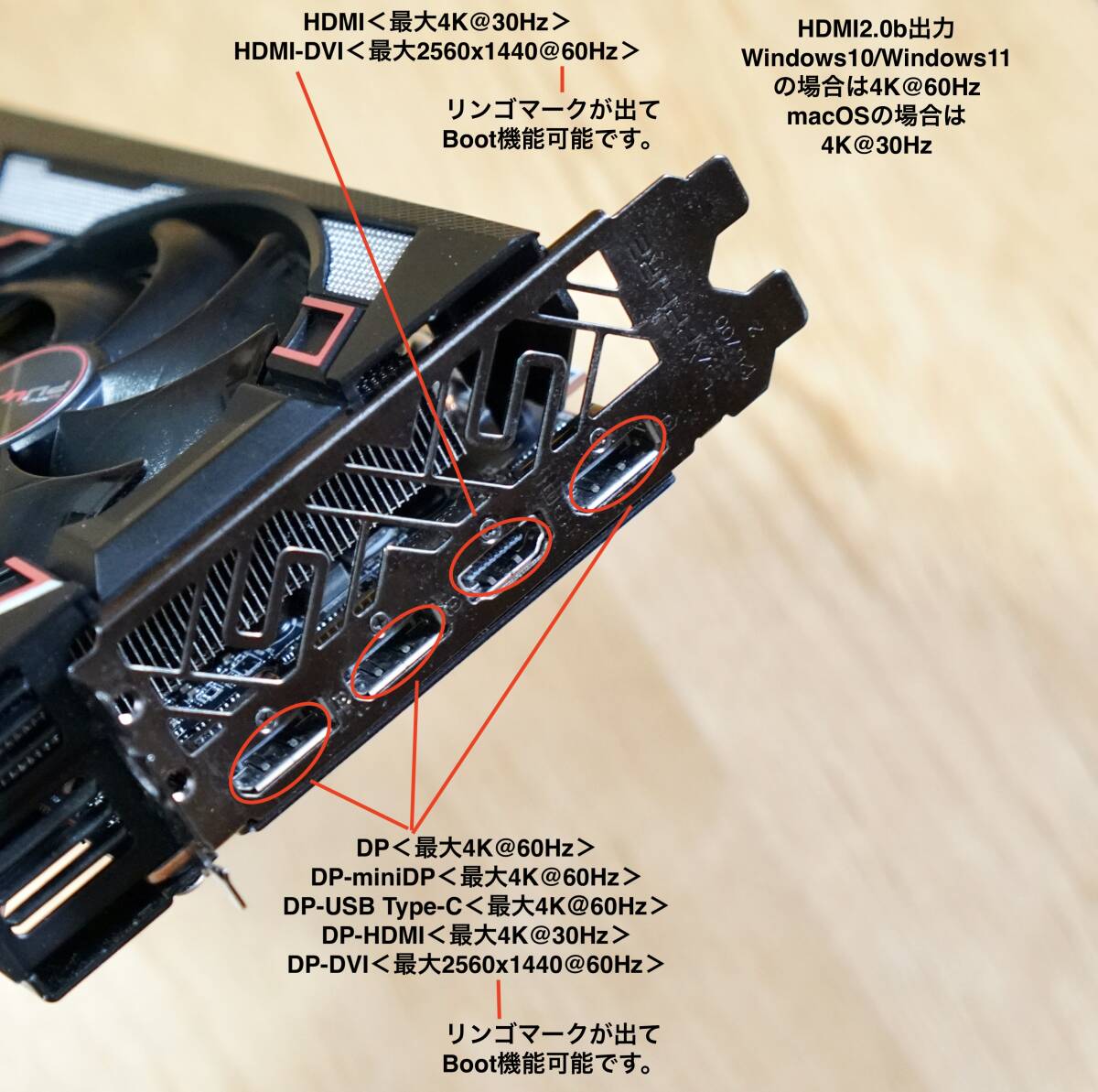
macOS Catalina/macOS BigSur/macOS MontereyでDisplayPort1.4規格の4KモニターDP出力で4K@60Hzにてリンゴマークが出てBoot機能が可能。
DisplayPort1.4からUSB Type-C4K@60Hz出力でもリンゴマークが出てBoot機能可能です。<音声出力も可能です。macOS Catalina~macOS Monterey>
HDMI2.0b 出力 4K@60Hz リンゴマークが出てBoot機能可能です。<Windows10.Windows11のみ対応><macOSの場合HDMI出力は4K@30Hzまで対応。>

<動作確認を行ったモニターです。>
ASUS VG2791R DPv1.2規格ゲーミングモニター
Dell P2415Q 4KDP1.2規格モニター<MSTタイプ><4Kモニター>
Dell U2720QM 4KDP1.4規格USB Type-Cモニター <4Kモニター>
Dell UZ2315H DP1.2規格モニター
LG W2361VG
LG W1946
注意事項 全てのメーカーのモニターで確認したわけではないのでご理解の上宜しくお願いします。

SAPPHIRE PULSE Radeon RX5700 GDDR6 8GB
GPUベースクロック:1540MHz
GPUゲーミングクロック:1700MHz
GPUブーストクロック:1750MHz
Memoryクロック:1.4Gbps<14000MHz> 実効値
コア数:2304コア
メモリー:GDDR6  8GB
メモリーパス  256bit
PCIe4.0x16 パス対応<MacPro PCIe2.0x16で動作>
専用スロットは2スロットです。
出力ポート HDMI2.0bx1 / Displayport1.4x3
HDMI2.0b 最大4096x2160@60Hz
DisplayPort1.4 最大5120x2880@60Hz
リンク速度:16.0GT/s
消費電力 187W
DirectX12
OpenGL4.6
OpenCL 2.0
Valkan
Shader Model 6.4
HDR対応
4KUHD
FREESYNC2
Metal対応<APIアプリケーションプログラミングインタフェース>対応<osx El Capitan以降>
BootCamp対応
対応機種:Mac Pro Mid2010~Mid2012
対応OS:macOS Catalina ~ macOS Monterey/Windows 7、10、11 <64Bit OS必須>
HDMI/DisplayPort音声出力対応OS  macOS Catalina~macOS Monterey Windows10.11

4K出力につきまして、画面表示の最高解像度が3360x1890までしか表示されないモニターがあります。
その際は、システム環境設定→ ディスプレイ → 解像度の変更をクリックする時、同時にoptionキーを押してクリックしてください。そうすれば、3840x2160が表示されるようになります。
<もう少し解像度の表示領域が広くなってくれればな~と思う方は以下のアプリを試されて見てはいかがでしょうか?>
「Display Menu」「BestRes」「Resolutionator」「SwitchResX」などがあります。

付属品はMacProグラフィックカード用PCI-Express8pinケーブル1本と6pinケーブル1本お付けします。

発送方法 佐川急便60サイズ
お支払い方法 yahoo簡単決済

<注意事項>
商品ページの情報だけではわからないことがあれば、必ず入札前に「この商品への質問」から質問してください。
日本語が理解できる方。<The person who can understand Japanese.>
発送方法の変更はできませんので宜しくお願いします。
値下げ交渉は、いたしておりませんので宜しくお願いします。
土、日、祝日は、レターパックプラス600や定形外での発送を行っていませんので宜しくお願いします。
代引き<代金引換>はしていません。
直接の取引はしていません。


Please log in before asking questions
Question list
All replies from original sellers (total number of questions: items)
After the seller responds, the original page will display the question
Product Price JPY
Japanese Consumption Tax(10%) JPY

A 10% consumption tax is applied to goods and services in Japan. The price may include the tax or it may be added separately. Please check the price details when ordering.

Note: This is a domestic sales tax applied within Japan.

Japan Local Shipping Fee JPY Japan Local Shipping Fee Reference
Product Weight KG The maximum weight limit is 30 kg
International Shipping Methods
Proxy bidding and purchasing services are becoming increasingly convenient. However, overseas shopping carries certain risks and issues. To reduce these risks and enhance shopping safety, please be sure to read the following information:

1. International Shipping

   Air Freight: If the item status is not confirmed within two days after the arrival notice, any customer complaints cannot be addressed with the seller.

2. After Receiving the Product

Please confirm and inspect the product as soon as possible to ensure that the product specifications, quantity, accessories, and description are correct

If, unfortunately, there are any issues, you can refer to the following examples on how to report related product problems:
1. Example of missing product information
2. Example of product not matching provided information
3. Example of damaged product information

Important Notes: 1. If the seller is unwilling to ship overseas or is unaware that the product will be shipped overseas, the international shipping cost for returns or exchanges will need to be borne by the member. You may refer to the EMS e-Express fee inquiry from the post office. If it involves alcoholic beverages or items that affect flight safety, the post office cannot be used for shipment, and only DHL can be used to ship back to Japan.
2. During the product complaint handling period, please retain the complete outer packaging of the product (including the shipping label information), and refrain from attempting any repairs or altering the original condition. Any modifications may result in the inability to process the case.

3. After Inspecting the Product

After receiving and inspecting the item, if you have any questions, it is recommended to contact Letao within 2 hours. Here are some reminders:

1. Please do not unpack, use or repair the received item yourself, and be sure to keep the original packaging to facilitate subsequent handling of related matters, so as to avoid changes to the item that may cause the seller to be unwilling to process.

2. You can call customer service, and the customer service will leave a message for you as below. Please provide the following information:
"Hello, we will first help you establish a complaint case for Product ID: _______ .But we need you to 2-3 clear photos of the product issue, including photos of the product problem, product packaging, shipping details slip, and outer box. Send them to service@letao.my and inform us of your desired resolution (failing to provide this may result in an inability to process subsequent matters). After sending the email, notify us in the customer service message. We will confirm with the seller as soon as possible. and if there are any related questions, we will contact you through the customer service message. Thank you for your cooperation."

Please provide:
1. "Product ID"
2. Photo of the "Delivery Note" (if any)
3. Photos of the outer box (including inner and outer packaging)
4. Photos of the product (Please include relevant descriptions to help us confirm with the seller)

Important Notes:
1. Do not include foreign text or other products in the background of the image.
2. Please keep the complete product packaging (including the shipping label information), and refrain from repairing or altering the original condition on your own, as any changes may result in the case being unable to be processed.
3. Please provide the relevant information within 48 hours to avoid missing the golden hour for reflection and causing situations that cannot be handled.
4. Due to 99% of Japanese sellers being unwilling or unaware of shipping goods overseas, if a seller is willing to handle the issue, the goods must be sent back to Japan, and the international shipping costs incurred must be borne by the member. Letao will use postal EMS international express to send the goods back to Japan.
5. As the goods are purchased from overseas, it may take approximately one to two weeks to complete the relevant processing procedures when issues arise with the goods. Please be reminded that you can inquire about the approximate cost through the EMS service at the post office.

4. FAQ

1. Issue of Authenticity: If antique or branded goods are found to be counterfeit upon receipt, clear photos showing the differences between the genuine product and the imitation must be provided as evidence. If unable to provide relevant proof, assistance can be sought to find a third-party reputable organization for a premium authentication service .
2. Leaking Iron Teapot: If an antique iron teapot is leaking, please take clear photos of the leaking area and provide them.
3. Transport Damage: If the goods are damaged during international shipping (to the pickup point), you need to provide photos of the outer packaging of the parcel and clear photos of the damaged goods' outer packaging.

※ Note: Photos provided to sellers should not contain any foreign-related information.
You may also like
    Seller products
    Excite Translate
    Add to watchlist and notes
    Product name: 限定!SAPPHIRE PULSE RX5700 8G macEFI 4K@60HzBoot機能対応 Metal対応 2010-2012MacPro 最新macOS Monterey12.7.6まで対応
    Notes:
    Customer service hours:
    • Monday to Friday 10:00-18:00
    Customer service hotline:
    Customer Service Email: service@letao.my