loading.gif
Notes
Login Sign Up Shopping Cart English
Add to my favorite categories
category Paint & Photo Retouching
Path Yahoo Bid > Computer & Accessories > Software > Windows > Graphics, Video & Music > Paint & Photo Retouching
Remarks
Add my favorite keywords
Keywords CD
category Paint & Photo Retouching
Remarks
Join my favorite seller
Seller 3LhkT***
Remarks
Add to my blacklist seller
Seller 3LhkT***
Remarks
Yahoo Bid Computer & Accessories Software Windows Graphics, Video & Music Paint & Photo Retouching
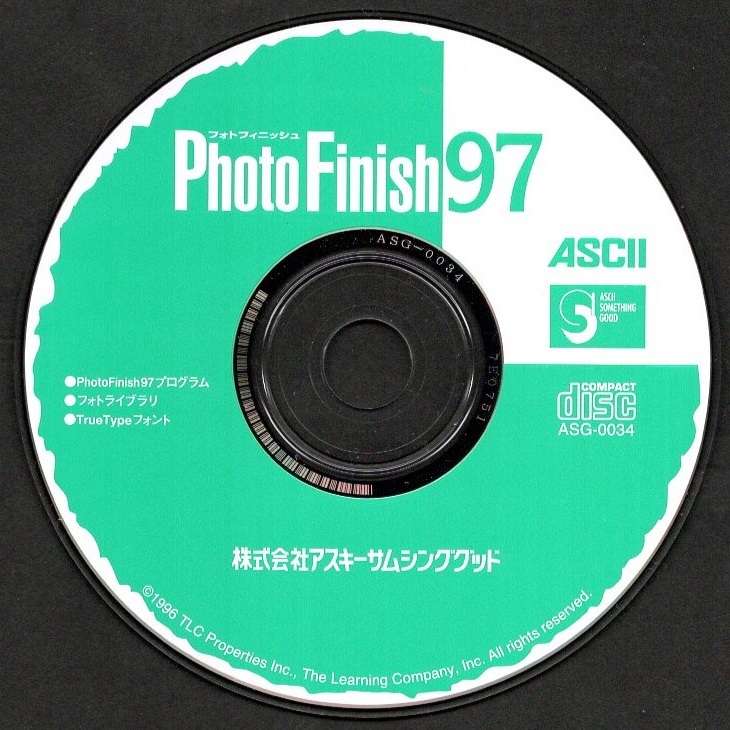
パソコンソフト アスキーサムシンググッド PhotoFinish97 CD-ROM ディスク確認済 フォトレタッチソフト
        

  • Product Quantity
    : 1
  • Starting Bid
    :300円
  • Highest Bidder
    : / Rating:
  • Listing Date
    :May 31, 2026 22:46
  • Bidding closes on
    :Jun 07, 2026 22:46
  • Auction Number
    :g1075132380
  • Condition
    :Damaged and stained (specify in description)
  • Automatic Extension
    :Yes
  • Authentication
    :No
  • Early Closing
    :Yes
  • Can I return the product?
    :no
  • Description
  • Q&A ()
  • Cost Estimator
  • Problem Item Response Procedur
Notes
  1. The seller does not provide return compensation and other responsibilities
【商品の説明】
・メーカー:アスキーサムシンググッド
・品名    :PhotoFinish97
・メディア:CD-ROM
・発売時期:1997年
・内容    :フォトレタッチソフト

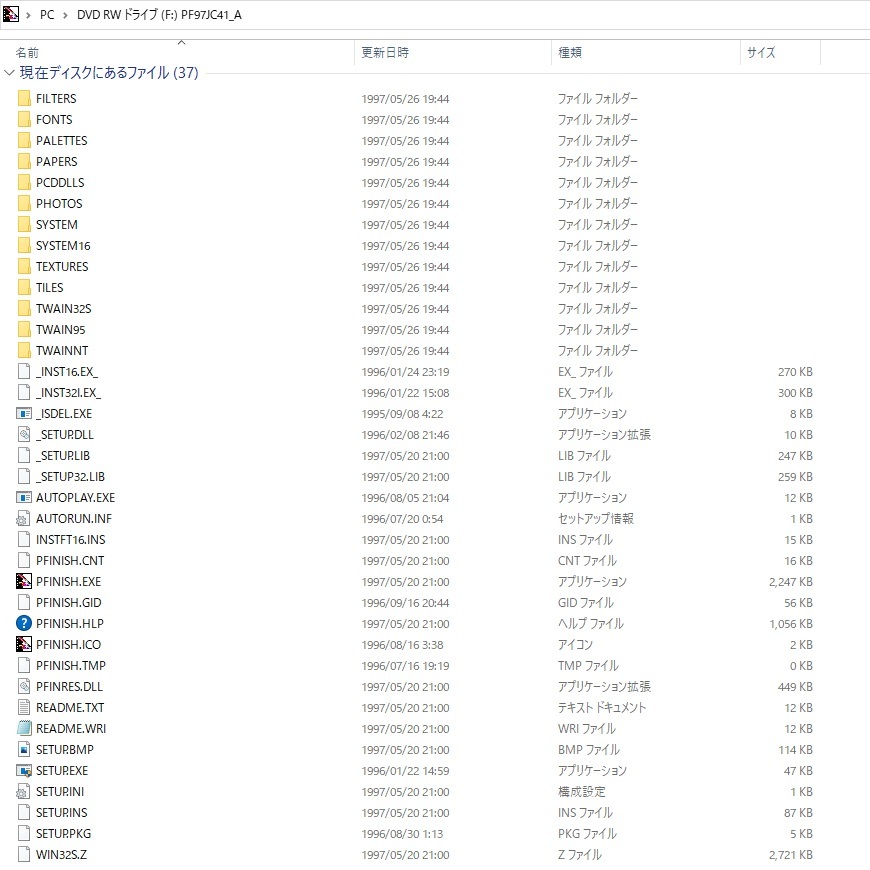
・3枚目の写真は、ルート・ディレクトリの内容です。
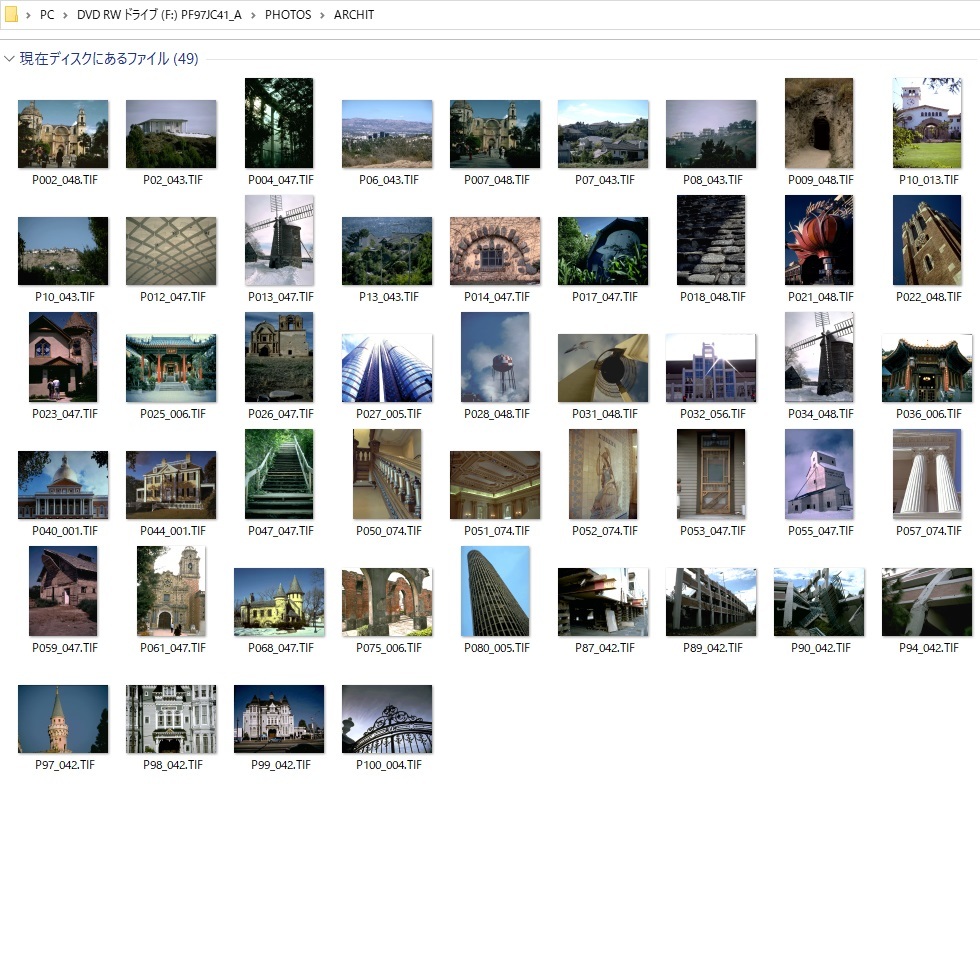
・最後の3枚の写真は、CD-ROMに収録されている写真の一部です。
・[README.TXT]の内容抜粋を一番最後に引用しておきます。

【商品の状態】
WindowsPCでCD-ROMディスクを読み取り、ディレクトリが表示されることでディスク確認済みとしています。動作確認は行っていません
・現状品として出品致しますので、ノークレーム・ノーリターンでお願いします。

【注意事項】

CD-ROMだけです。説明書などはありません
・説明文には十分に注意を払っていますが、万が一、説明文と写真の内容とが食い違っている場合には、写真を優先します。
・電池で動作する商品の場合、特別の記載がない限りは、商品に電池は含まれません。
・商品のサイズを示すために定規(金属製の物差し)が写真に写っている場合がありますが、あくまで大きさの参考であり、商品には含まれません。

【発送】
送料無料、つまり出品者負担です。
・お支払いから2~3日以内に、匿名配送で配達状況を追跡可能な「ゆうパケット」で発送します。
・梱包資材は、リサイクル品を使用します。
「まとめて取引」のご依頼を歓迎します。

【その他】
・不明点はご質問ください。
・勝手ながら、出品者を評価していただいた方のみ、落札者の評価をさせていただきます。評価が不要な方は、出品者の評価を行わないでください。
・発送に「ゆうパケット」または「ゆうパック」を用いる場合は郵便局から発送しているため、お支払いが土日祝日の前日または前々日となった場合には、発送が土日祝日明けになる可能性があります。
・お支払いから3日以内(72時間以内)の発送を原則としていますので、特に理由がなければ72時間以内にこちらから取引メッセージを送ることはありません。
・匿名配送を利用しているので、代行業者以外の一般の方は、氏名・住所などを取引メッセージで開示しないでください。

【REARME.TXT】(抜粋)

PhotoFinish97 をお買い上げいただきまして、誠にありがとうございます。

PhotoFinish97 をご使用いただくにあたり、何点か注意すべき事柄が有ります。
下記注意事項をお読みの上ご利用ください。

===================================================
添付の写真データ及び欧文フォントの使用に関する注意事項
===================================================
PhotoFinish97 に付属している写真及びフォントの使用に関しましては、以下の条件をよくお読みになったうえで、お使いいただきますようお願いいたします。

Ⅰ.使用に関する許可について
---------------------------
1. 写真データ及び欧文フォントは、登録ユーザ以外に使用することを許可していません。

2. 写真データ及び欧文フォントを印刷出力したものに関しては、原則として、使用することを許可しています。例えば、印刷物であれば、本や会報、プレゼンテーション資料、社内配布資料等の中に使用することができます。

3. 印刷物で、許可しない行為を下記に示します。
 (i)商品パッケージ、カタログ、商標や名称のデザイン等、直接商品に関わるものへの使用。
 (ii)公序良俗に反する、いわゆるワイセツ物に関わる物品への使用。

4. 写真データ及び欧文フォントをデジタルデータのまま再配布することは許可していません。
 再配布とは、下記のとおりです。
 (i)写真データを、オンラインサービスやインターネットのホームページ等に使用する事。
 (ii)写真データをディスク、MO、CD-R等の記録メディアにコピーして、登録ユーザ以外の第三者に有償・無償を問わず譲渡する事。
 (iii)写真データ及び欧文フォントを販売、および他のソフトウェア製品に添付して販売する事。

個人的なコレクションや素材などとしてお使い下さい。

Ⅱ.著作権について
-----------------
添付の写真及びフォントデータの著作権は (c) 1996 TLC Properties Inc.にあります。

=============================================
使用上の制限事項
=============================================
1.Windows 3.1上で、PhotoFinish97をご使用になられるユーザーの方は、下記理由により、システムフォントが16pt.でのご使用をお奨めします。
システムフォントが16pt.より小さい場合、正常にダイアログ等が動作しないことがあります。
また、システムフォントが16pt.より大きい場合、ダイアログ等の表示が乱れることがあります。

インストールプログラム終了後、[プログラムマネージャ]の[メイン]ウィンドウ内の[Windowsのセットアップ|ディスプレイ]にて、ご確認ください。
16pt.以外の設定になっている場合は、16pt.に変更してお使いいただきますようお願いいたします。

2.添付の欧文フォントには、下記制限が有ります。
フォントの特性上、一部のフォントには、アルファベット52文字と数字10文字以外の記号文字の無いフォントが有ります。

3.PhotoFinish97の「フィルタ」・「特殊効果」・「画像調整」、および、筆の「筆圧」・「透明度」などの効果は、フルカラーでのみ、効果が有ります。
添付画像を含めて、256色の画像をご使用になる場合は、いったん、フルカラーデータに変更して、処理効果を選択してください。

4.PhotoFinishは、Windows3.1上では、プラグインをサポートしていません。
Windows3.1では、オプションでのプラグイン設定や(Plugins)ディレクトリへの、プラグインプログラムのコピーはおこなわないでください。
もしプラグインを設定した場合は、起動時に、使用できない旨のメッセージが
繰り返し表示されます。 [OK] を数回押して起動した後、再設定してください。
もしくは、終了後に(Plugins)ディレクトリよりプラグインプログラムを削除
してください。

=============================================
PhotoFinish97 の新しい機能
=============================================
PhotoFinish97 は、Windows95用の32bitアプリケーションです。OLE2.0に準拠したドラッグ&ドロップ、ロングファイル名称のサポート、ツールのヒント表示やMAPI対応の電子メールへの出力など、Windows95上で簡単操作できる便利な機能を網羅いたしました。

操作性をアップ!
===============
ブラシやペンなどのペイントツールには、オプションスライダーを追加して、より微妙な筆圧や透明度などを簡単設定できるようになりました。

マスク機能の追加
===============
マスク機能は、編集やレタッチ作業から選択した範囲を守ります。初心者から上級者まで、思い通りのイメージを作ることができるでしょう。

プラグインフィルタへの対応
=========================
PhotoFinish97 は、サードパーティー製のプラグインフィルタを使うことができます。例えば「Kai Power Tools 3J」や「Adobe Photoshop 3.0」向けに作られた32bit版のプラグインフィルタなどです。

特殊効果の追加
==============
新しい特殊効果を追加しました。「ソラリゼーション」と「アンティーク」です。フィルタのサンプルにて確認してみて下さい。
「ソラリゼーション」は、「フィルムの現像中に第二次露光をかける」という写真現像の処理効果です。
「アンティーク」は、古い写真のようにセピア色になった効果を与えてくれます。

元に戻す・やり直し 機能の強化
============================
無限に、元に戻せるようにしました。
 (読み込んだ時点、若しくは最後にセーブした時点まで戻れる)
無限に、やり直しできるようにしました。
 (元に戻しはじめた時点まで戻れる)

ペースト画像の透過率を調整する機能の追加
======================================
ペーストした画像をペースト元の画像に馴染んだ効果を出すために、[貼り付け調整]機能を追加しました。次の境界をぼかす機能とあわせれば、効率よく画像の合成が行えます。

境界をぼかす機能の追加
=====================
画像の合成で、ペーストした画像をペースト元の画像に馴染んだ効果を出すために、[境界をぼかす]機能を追加しました。画像の合成が簡単に行えるようになりました。

文字ツールの強化
===============
今までの文字入力は、選択を解除すると画像に定着しましたが、PhotoFinish97 では、文字を[定着]指示するまで、自由に範囲変更や文字列の編集ができます。画像の保存か、[定着]ボタンをクリックするまで、文字位置やフォントタイプ・サイズなどの修正がおこなえます。

画像フォーマットの追加
=====================
従来の、PCX, BMP, TIF, GIF, JPG, TGA, EPS(読み込み), Kodak PCD(読み込み)に加え、PCT, EPS(書き込み), GIF(透過GIF・インターレスGIF)を新規に追加しました。

画像フォーマットの制限事項
=========================
1. 対応ファイルと同じ識別子を持った名称の画像ファイルでも、アニメーションGIFなどの様に独自の加工をされているものがあります。
PhotoFinish97で対応していないファイルを読み込もうとした場合、「ファイルを開けません。認識できないファイル形式です。」というダイアログを表示します。

2. 現在確認できている対応していないファイルは下記のファイル形式です。
 ・プログレッシブJPEG
 ・アニメーションGIF

3. Macintoshの一部のグラフィックソフトとの間で共通使用できないファイルがあります。
 ・EPSファイル
 ・TIF ファイル

4. PCT (PICT)ファイル形式に関する制限
PhotoFinish97 では、Macintoshで作成された PICTファイルを読み込むことができます。但し、旧タイプの Macintoshや、一部のスクリーンキャプチャユーティリティで作成された PICTファイルに関しては、読み込めないことがあります。

===================================
使用に当たっての注意事項
===================================

PhotoFinish97 のインストールとアンインストール
============================================
PhotoFinish97 のアンインストーラでは、プログラム本体の削除はおこなえますが、フォントファイルは削除いたしません。
PhotoFinish97 のインストール時に、20種類の付属文字フォントをインストールされた方は、ほかのソフトでも使用できますので、そのままご使用になられますようお願いいたします。

グラフィックカードの競合
=======================
グラフィックアクセラレータのドライバが古い場合、PhotoFinish97 のインストールが中断してしまうことがあります。この場合はお手数ですが、お使いのグラフィックアクセラレータのドライバを最新の物にしてから、PhotoFinish97 のインストールを行って下さい。

メインメモリ容量が少ない場合
===========================
メインメモリが少ない状態で、非常に大きな画像を編集する場合、PhotoFinish97 がハードディスクにテンポラリファイルを作りますが、それでも間に合わない時は「メモリ不足「となり、編集作業ができなくなってしまいます。ハードディスクの空きが十分でないと言うことは、PhotoFinish97 のテンポラリファイルをも作ることができませんので、大きい画像の編集はできないことになります。
まず、ヘルプファイルを参照するなどして、メモリ割り当ての参考として下さい。
それから、[オプション|環境設定|メモリ]メニューより[メモリの設定]ダイアログボックスを表示して設定してください。

スキャナとデジタルカメラの使用に関して
====================================
PhotoFinish97 は、様々なスキャナやデジタルカメラ等からのデータ読み込みをサポートしています。
これらの機器を使用する場合、まず最初に機器の選択をしなければなりません。 メニューより、[ファイル|TWAIN[外部入力]|機器の選択]を選択し、[ソースの選択]ダイアログボックスを表示してください。 TWAIN機器の一覧リストが表示されます。そのリストから使用したい機器を選択してください。リストが表示されない場合は、お使いになられます TWAIN機器のTWAINドライバをインストールしてから、再度実行して下さい。
TWAINドライバは、Windows95 では、32bit版を、Windows3.1では 16bit版が動作いたします。

ツールバーに関して
=================
いくつかのツールアイコンには、関連したツールアイコンが存在します。右下に黒い三角印が付いたアイコンはそれを表わしています。黒い三角印の付いたツールアイコンをクリックしたままにすると、それに連なるツールアイコンが表示されます。クリックしたまま、目的のツールまでマウスポインタをドラッグして、目的のアイコンで指を離してください。

オプションバーに関して
=====================
Windowsの画面設定により、オプションバー内にある「スクリーン」、「ユーザー設定値を読み込む」及び「ユーザー設定値の登録」の各アイコンが、画面からはみ出る場合があります。オプションバーをドラッグして移動させるか、グレー色の部分をダブルクリックすると、オプションダイアログボックスとして表示されます。この時、アイコンで表現されていた物はボタン名が見えるようになります。同じ方法で、ダイアログボックスをバーとして戻すこともできます。

タイルパターンに関して
=====================
PhotoFinish97 をインストールすると、25種類を越えるタイルパターンが使えるようになり、四角形ツールで使用できます。タイルパターンの大きさは、描く四角形の大きさに左右されます。例えば「オプション|タイルパターン]で「Wood.pic」を指定した場合、指定する範囲に丁度良く収まるような木目が描画されます。
Please log in before asking questions
Question list
All replies from original sellers (total number of questions: items)
After the seller responds, the original page will display the question
Product Price JPY
Japanese Consumption Tax(10%) JPY

A 10% consumption tax is applied to goods and services in Japan. The price may include the tax or it may be added separately. Please check the price details when ordering.

Note: This is a domestic sales tax applied within Japan.

Japan Local Shipping Fee JPY Japan Local Shipping Fee Reference
Product Weight KG The maximum weight limit is 30 kg
International Shipping Methods
Proxy bidding and purchasing services are becoming increasingly convenient. However, overseas shopping carries certain risks and issues. To reduce these risks and enhance shopping safety, please be sure to read the following information:

1. International Shipping

   Air Freight: If the item status is not confirmed within two days after the arrival notice, any customer complaints cannot be addressed with the seller.

2. After Receiving the Product

Please confirm and inspect the product as soon as possible to ensure that the product specifications, quantity, accessories, and description are correct

If, unfortunately, there are any issues, you can refer to the following examples on how to report related product problems:
1. Example of missing product information
2. Example of product not matching provided information
3. Example of damaged product information

Important Notes: 1. If the seller is unwilling to ship overseas or is unaware that the product will be shipped overseas, the international shipping cost for returns or exchanges will need to be borne by the member. You may refer to the EMS e-Express fee inquiry from the post office. If it involves alcoholic beverages or items that affect flight safety, the post office cannot be used for shipment, and only DHL can be used to ship back to Japan.
2. During the product complaint handling period, please retain the complete outer packaging of the product (including the shipping label information), and refrain from attempting any repairs or altering the original condition. Any modifications may result in the inability to process the case.

3. After Inspecting the Product

After receiving and inspecting the item, if you have any questions, it is recommended to contact Letao within 2 hours. Here are some reminders:

1. Please do not unpack, use or repair the received item yourself, and be sure to keep the original packaging to facilitate subsequent handling of related matters, so as to avoid changes to the item that may cause the seller to be unwilling to process.

2. You can call customer service, and the customer service will leave a message for you as below. Please provide the following information:
"Hello, we will first help you establish a complaint case for Product ID: _______ .But we need you to 2-3 clear photos of the product issue, including photos of the product problem, product packaging, shipping details slip, and outer box. Send them to service@letao.my and inform us of your desired resolution (failing to provide this may result in an inability to process subsequent matters). After sending the email, notify us in the customer service message. We will confirm with the seller as soon as possible. and if there are any related questions, we will contact you through the customer service message. Thank you for your cooperation."

Please provide:
1. "Product ID"
2. Photo of the "Delivery Note" (if any)
3. Photos of the outer box (including inner and outer packaging)
4. Photos of the product (Please include relevant descriptions to help us confirm with the seller)

Important Notes:
1. Do not include foreign text or other products in the background of the image.
2. Please keep the complete product packaging (including the shipping label information), and refrain from repairing or altering the original condition on your own, as any changes may result in the case being unable to be processed.
3. Please provide the relevant information within 48 hours to avoid missing the golden hour for reflection and causing situations that cannot be handled.
4. Due to 99% of Japanese sellers being unwilling or unaware of shipping goods overseas, if a seller is willing to handle the issue, the goods must be sent back to Japan, and the international shipping costs incurred must be borne by the member. Letao will use postal EMS international express to send the goods back to Japan.
5. As the goods are purchased from overseas, it may take approximately one to two weeks to complete the relevant processing procedures when issues arise with the goods. Please be reminded that you can inquire about the approximate cost through the EMS service at the post office.

4. FAQ

1. Issue of Authenticity: If antique or branded goods are found to be counterfeit upon receipt, clear photos showing the differences between the genuine product and the imitation must be provided as evidence. If unable to provide relevant proof, assistance can be sought to find a third-party reputable organization for a premium authentication service .
2. Leaking Iron Teapot: If an antique iron teapot is leaking, please take clear photos of the leaking area and provide them.
3. Transport Damage: If the goods are damaged during international shipping (to the pickup point), you need to provide photos of the outer packaging of the parcel and clear photos of the damaged goods' outer packaging.

※ Note: Photos provided to sellers should not contain any foreign-related information.
You may also like
    Seller products
    Excite Translate
    Add to watchlist and notes
    Product name: パソコンソフト アスキーサムシンググッド PhotoFinish97 CD-ROM ディスク確認済 フォトレタッチソフト
    Notes:
    Customer service hours:
    • Monday to Friday 10:00-18:00
    Customer service hotline:
    Customer Service Email: service@letao.my